We earn a commission if you buy through our links, at no extra cost to you.
Best Under-Desk Treadmill for a Home Office
Walking pad or full treadmill for your home office? Desk height, speed limits, noise, storage and safety, plus the WalkingPad models and folding options that fit.
At a glance
For a home office, a walking pad is the usual answer. The WalkingPad C2 is the lighter fold-flat option at 55 lb, and the WalkingPad A1 Pro adds a wider belt and a higher-capacity option. If you want to jog or hold a handrail, a full folding treadmill like the Sunny SF-T723030 is the better fit.


A treadmill in a home office is a different purchase from a treadmill in a spare room. It has to slide under a desk or out of sight when a client call starts, it has to be quiet enough for a shared wall or the unit below, and it has to be simple enough that you do not fiddle with it between emails. That is why a whole product category, the walking pad, exists. It is also why the right answer is sometimes a full folding treadmill instead.
We compared the manufacturers’ published specs, name the source for every figure and say so where sources disagree. This guide covers what to look for, how to set the machine up safely, and which models in our lineup fit.
This product is not a medical device and does not replace advice from a healthcare professional. Read the manufacturer’s instructions before first use.
Walking Pad or Full Treadmill?
Start with this choice, because it decides everything else.
A walking pad has a belt of about 47 inches, a top speed near 4 mph, and no handrail or console tower. It is designed to be used at a desk, and it folds almost flat. WalkingPad is blunt about the limit: its page says the C2 is designed for walking and brisk walking with a 4 mph maximum, so it is not suitable for running.
A full folding treadmill has handrails, a console, a longer deck and speeds up to 10 mph or more. It does not slide under a desk. Sunny’s SF-T723030 is 63.8 inches long, 30.9 inches wide and 45.7 inches tall, per Sunny, and XTERRA’s TR150 stands 60.7 inches tall when folded, per XTERRA. Those are pieces of equipment you set up in a room.
A simple rule: if the machine will mostly sit under a desk while you work, and you never plan to jog on it, buy a walking pad. If you want one machine for both desk time and jogging, or you want a handrail to hold, buy a folding treadmill and set it up beside the desk.
What Matters in a Walking Pad
Desk Height and Floor Space
The deck itself is thin: WalkingPad lists about 4.9 inches unfolded for the C2 and 5 inches for the A1 Pro. The desk is the harder part. You need a height-adjustable desk that rises high enough to stand at, with a monitor that works at that height. Measure your desk’s maximum height before you order, and measure it with your shoes on.
Then count floor length. The C2 unfolds to 56.9 x 20.4 inches and the A1 Pro to 56.5 x 21.5 inches, per WalkingPad. The belt is only about 47 inches, but the frame and motor housing add length, and you need clear floor behind the belt too. Treadmill manuals state how much open space to leave behind the deck, so read that figure for your model and add it to your plan. Keep cables, chair legs and boxes out of that zone.
Speed Range and Control
Both WalkingPad models offer three ways to set speed, according to WalkingPad: the KS Fit app, a handheld remote and FootSense, the maker’s name for foot-position sensing. The A1 Pro lists 0.5 to 3.75 mph, and the C2 lists 1 to 4 mph. The two figures overlap closely, so the real difference is how you control the machine.
On a video-call day, the remote is the simplest option because it does not depend on where your feet sit on the belt. FootSense is meant to let you speed up by stepping forward and slow down by stepping back, but Garage Gym’s spec page for the C2 says the auto-speed feature does not always work and that a phone is needed to use all speed increments. If you dislike apps, try the remote first.
Noise
Noise has two parts: the motor and your feet. WalkingPad lists the A1 Pro motor at under 65 dB, which is a manufacturer figure, not an independent measurement. For the C2, WalkingPad says the motor runs quietly enough not to disturb anyone else and gives no figure. Neither number covers the sound of footfall on the belt or vibration through the floor.
If you rent or live above neighbors, check your lease or HOA rules for quiet hours before you decide when you will use the machine. Rules vary by building, so read yours rather than assuming. A rubber treadmill mat under the deck is a common, inexpensive way to protect the floor and soften what travels downward. Put the machine on a hard, level surface, not on a thick rug that lets the deck rock.
Weight Limits
Check the user limit against the person who will use it. WalkingPad lists 220 lb for the C2. For the A1 Pro, WalkingPad’s page lists two options, 230 lb and 300 lb, and its heading highlights the 300 lb capacity. Confirm which number applies to the exact Amazon listing and in the manual that ships with your unit. Do not assume the higher figure on the brand’s page applies to what arrives.
Storage
The point of a walking pad is that it disappears. Both WalkingPad models fold in half to about 5 inches thick and have built-in wheels. Folded sizes are 32.5 x 20.4 x 5.4 inches for the C2 and 32.5 x 21.5 x 5 inches for the A1 Pro, per WalkingPad. Net weights are 55 lb and 63 lb. That is a two-handed lift, so test the route to your storage spot, whether that is under a sofa, behind a door or in a closet, before you commit.
Using Any Treadmill Safely at a Desk
An under-desk machine has no handrail, so a few habits matter more than they would on a full treadmill.
- Read the manual first. The voluntary U.S. standard for treadmills is ASTM F2115. According to ASTM, it covers stability, guarding of moving parts, a clearly marked stop switch and warnings for users and bystanders. A standard is not a guarantee for any one product, so follow your manual. WalkingPad’s pages list a wristband in the box but do not explain it, so read the manual to learn how the stop function works.
- Keep your feet centered on the belt and do not step on or off while it is moving quickly.
- Keep children and pets away while the belt runs, and unplug the machine when you are done. If you work in a room the household shares, think about where the cord runs.
- Mind the cord. Plug into an outlet that meets the manual’s requirements, keep the cord clear of the belt and your chair wheels, and avoid extension cords unless the manual allows them.
- Do not leave the deck standing upright unless the manual says it can. Sunny, for example, says to lay its treadmill flat and slide it under furniture for storage because it has no stability bumpers for upright storage.
Models From Our Lineup for a Home Office
The Lighter Pick: WalkingPad C2
A fold-in-half walking pad at 55 lb, with a remote, FootSense and the KS Fit app for speed control. A good match for a slim desk setup and a user under 220 lb.
According to WalkingPad, the C2 arrives fully assembled, has a 47.2 x 15.7 inch walking area and runs from 1 to 4 mph. It has an LED screen on the deck and a 1-year warranty with an optional extension. Its limits are the 220 lb user capacity and the app dependence Garage Gym describes. Our WalkingPad C2 profile lists the full specs.
The Wider-Belt Pick: WalkingPad A1 Pro
A slightly wider belt, a 0.5 mph lower minimum speed and a higher-capacity option, with a stated motor noise level under 65 dB. Check which weight limit your listing carries.
WalkingPad lists a 47 x 16.5 inch walking area and a 63 lb net weight. It uses the same three speed controls as the C2 and has the same 1-year warranty. It is the better match if you need a limit above 220 lb or prefer a roomier belt, with the caveat about the two capacity options. See the WalkingPad A1 Pro profile.
When a Full Treadmill Makes More Sense: Sunny SF-T723030

A full folding treadmill with handrails, a 20.1-inch-wide belt and motorized incline. Choose it if you want to jog, not just walk, and have room beside your desk.
The Amazon title says “Walking Pad,” which is misleading. Sunny’s own page describes a full treadmill with a 53.1 x 20.1 inch running surface, speeds of 0.6 to 10 mph, 15 auto incline levels and a 300 lb user limit. It is fully assembled and folds. It will not slide under a desk, so it suits a home office with a spare corner. Read the Sunny SF-T723030 profile before you buy.
The Basic Alternative: XTERRA TR150
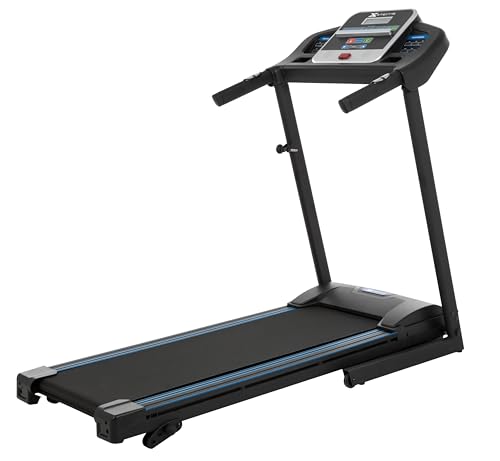
A plain folding treadmill with handrails, a 16 x 50 inch deck and three manual incline levels, with no app or subscription needed.
XTERRA lists a 2.25 HP motor, 0.5 to 10 mph, a 250 lb user limit and a folded size of 27.6 x 28.75 x 60.7 inches. It weighs 97 lb net. It is a good fit for someone who wants handrails and a simple console, and a poor fit for anyone who wants it hidden under a desk. See the XTERRA TR150 profile for more.
Which One for Which Office
- Slim desk setup, one user under 220 lb, lightest machine: WalkingPad C2.
- Wider belt or a higher weight limit, and you can confirm the listing: WalkingPad A1 Pro.
- You want to jog, hold a handrail or use incline: Sunny SF-T723030.
- You want handrails and a basic console without an app: XTERRA TR150.
A walking pad belongs under a desk, and a folding treadmill belongs next to one. For the whole field, compare every model in our best treadmills of 2026 ranking.
Before You Order
- Desk height: Confirm it raises high enough to work at while standing over the deck.
- Floor length: Allow about 57 inches for a walking pad plus clearance behind it, and more for a full treadmill.
- Weight limit: Match it to the user and to the exact listing.
- Neighbors: Read your lease or HOA quiet rules and plan a mat.
- Outlet: Follow the manual’s power guidance.
- Storage route: Confirm that you can carry the folded weight to where it will live.
Sources
- WalkingPad C2 Foldable Walking Treadmill, official product page (WalkingPad)
- WalkingPad A1 Pro Foldable Under-Desk Treadmill, official product page (WalkingPad)
- Sunny Health & Fitness SF-T723030 official product page
- XTERRA TR150 official product page (XTERRA Fitness)
- ASTM F2115-25, Standard Specification for Treadmills (ASTM)
Frequently asked questions
What is the difference between an under-desk treadmill and a regular treadmill?
An under-desk treadmill, usually called a walking pad, has a short belt, a low top speed and no handrail or console tower, so it can slide under a standing desk. A regular treadmill has handrails, a console and higher speeds, and needs far more floor space. WalkingPad lists 4 mph at most for the C2 and 3.75 mph for the A1 Pro.
Can I run on a walking pad?
Not on the ones in this guide. WalkingPad says the C2 is designed for walking and brisk walking, with a 4 mph maximum, and is not suitable for running. If you want to jog, look at a full folding treadmill such as the Sunny SF-T723030, which lists speeds up to 10 mph.
Will a walking pad fit under my standing desk?
The decks are thin, about 5 inches tall per WalkingPad, so the machine itself is rarely the problem. The question is whether your desk raises high enough for you to stand and type at it, and whether you have about 57 inches of floor length, since the C2 unfolds to 56.9 inches and the A1 Pro to 56.5.
Are walking pads loud?
WalkingPad lists a motor noise level under 65 dB for the A1 Pro and describes the C2 motor as quiet enough not to disturb anyone else, without giving a figure. Footfall on the belt is separate from motor noise, so a mat under the deck is a sensible addition if neighbors live below.
Do I need an app to control a walking pad?
WalkingPad lists three ways to set speed on both models: the KS Fit app, FootSense and a handheld remote. The remote works without a phone, but Garage Gym's spec page says the C2 needs a paired phone to use all speed increments.
How do I store a walking pad?
Both WalkingPad models fold in half to about 5 inches thick and have built-in wheels, so they can slide under a bed or sofa or stand against a wall. At 55 lb for the C2 and 63 lb for the A1 Pro, plan the storage spot before you buy.